
RipFrame for Windows
Capture every frame.
Turn what's on your screen into a crisp GIF or MP4 — with a zoom lens that follows your cursor, click ripples and on-screen keys, so viewers never miss a step.
Features
Everything a good demo needs
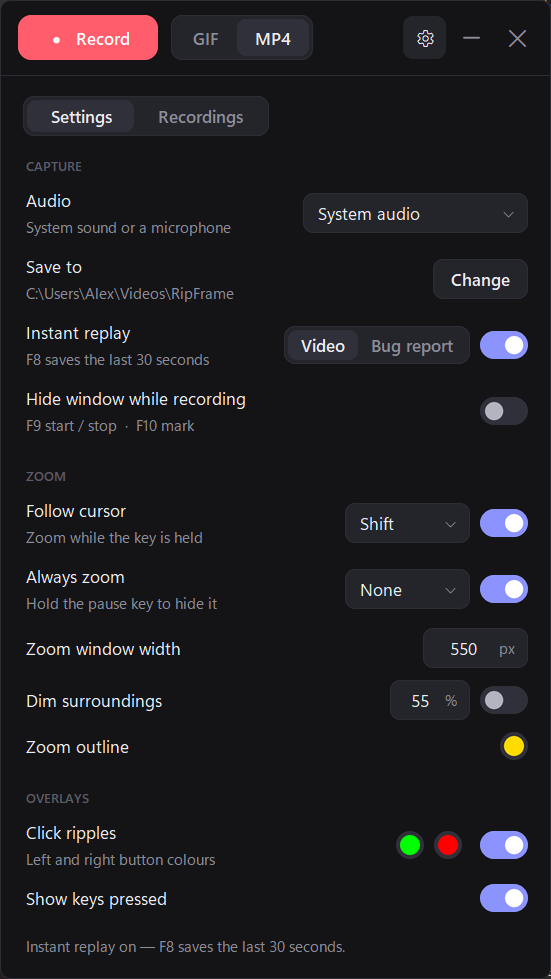
GIF or 1080p MP4
Short loops for chats and docs, or full MP4 video with system sound or your microphone.
Zoom that follows you
A magnified inset tracks your cursor and never covers what you're pointing at.
Clicks and keys, visible
Ripples show every click and on-screen keys show shortcuts as you press them.
Instant replay
Something just happened? Press F8 to save the last 30 seconds.
Bug reports in one key
Replay, screenshot, system details and the steps you took — typed text is never recorded.
Invisible to itself
RipFrame's own window stays out of your recordings, so only your work shows.
How it works
Record. Mark. Export.
- Press F9 to start — ● the window can even hide itself.
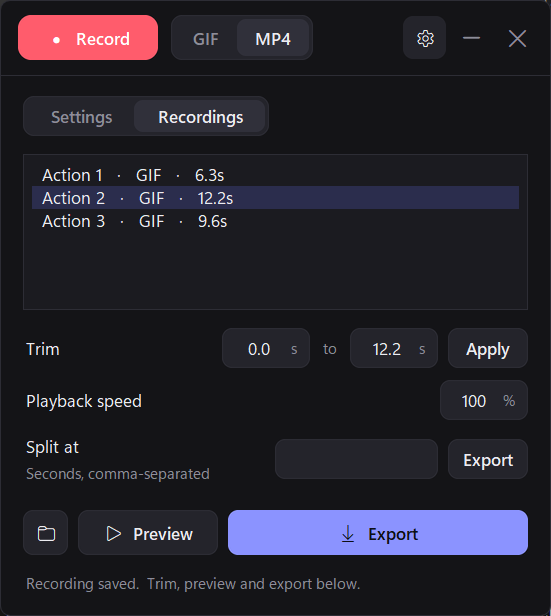
- Press F10 to split your session into separate actions as you go.
- Trim, preview and export each action as a GIF or MP4, or split a clip at any second.
Private by design: RipFrame works offline and never uploads your recordings. Privacy policy
Requirements
Windows 10 (version 2004) or Windows 11, 64-bit. Questions? support@oexta.com